
Did you apply for admission into Ahmadu Bello University (ABU), Zaria? Then the wait is almost over. ABU has started uploading admission lists on JAMB CAPS. As of 28th September, 2025, the first and second batches were already live on the portal.
If you took part in the 2025/2026 admission screening exercise, you can now check your name on the provisional admission list. If your name is not yet included, do not panic. More lists will come out, including the third batch and the supplementary list. You can also reach out to the ABU Admissions Office for more information or questions.
How to Check Your Admission Status on JAMB CAPS
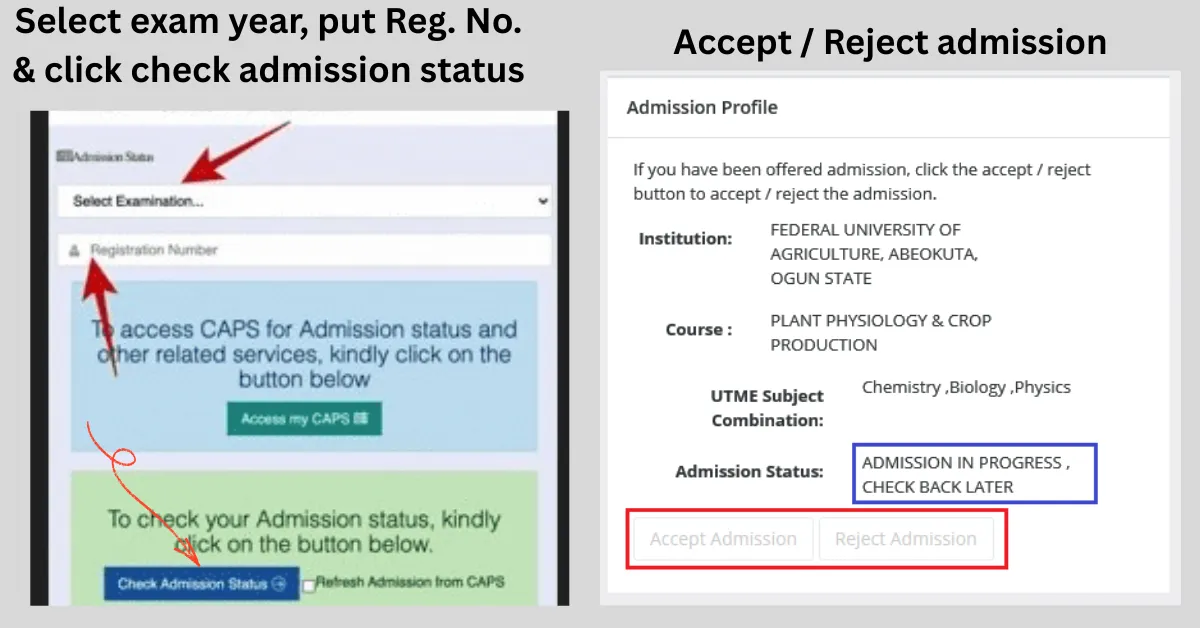
Here is a quick and easy guide on how to check your admission status on JAMB CAPS:
Visit https://efacility.jamb.gov.ng/ and log in using the email and
password created during registration.Select Check Admission Status

Pick your examination year and type in your JAMB Registration
number.Tap on Admission Status to view your status.
What Your JAMB CAPS Admission Status Means
“Congratulations! You have been offered provisional admission.”
This means ABU has given you admission. You should go ahead and click Accept or Reject on JAMB CAPS to confirm your choice. To help prepare for the school year, you can check out ABU’s 2025/2026 academic calendar.“Admission in Progress”
Your admission is almost ready. You have been recommended, and the update is still being processed. Keep checking JAMB CAPS regularly until the final status changes.“Not Admitted”
You have not been offered admission yet. If you see this, do not lose hope. Keep checking the portal from time to time, as the third and supplementary lists are yet to be uploaded.
What To Do After Admission Is Confirmed
After accepting your admission, make sure that you:
Print your JAMB admission letter.
Keep the document safe for clearance and registration when school resumes.
This will be required during physical screening, so do not forget to do this.
Frequently Asked Questions (FAQs)
Q: When will ABU finish uploading the admission list on JAMB CAPS?
A: The uploading is done in batches. If you do not see your name yet, keep checking because more lists, including supplementary batches, will still be released.
Q: What should I do after I have accepted my admission on CAPS?
A: After accepting, make sure you print your JAMB Admission Letter and JAMB Original Result Slip. You will need them during physical clearance at ABU.
Q: Do I have to pay an acceptance fee?
A: No, it has been included in your school fees. For a full breakdown of all the charges, see the ABU school fees schedule.
Q: How long do I have to accept or reject my admission?
A: You have 4 weeks from the date your admission appears on CAPS. If your linked phone number is missing, visit a JAMB approved centre to help you accept.
Q: Can I still gain admission if my status shows “Not Admitted”?
A: Yes, especially at this early stage. Continue to check JAMB CAPS because more batches, like the third list and supplementary admissions, will be uploaded.
Q: How do I contact ABU if I have a problem with my admission?
A: You can reach out to the ABU Admission Office directly through their official channels, email, or visit the school’s admission unit for guidance.



Leave a Reply